


Publit
Get started
What is Print on Demand?
"The move to POD is not about the technology of printing, it's about the technology of distribution."
– Richard Charkin
Print on Demand (POD) is a way to print books one by one. Instead of printing an edition of 1,000 books to be stored in a warehouse, which involves ongoing costs, you can print POD through Publit. You upload ready print files to Publit, and when a book is sold, it is printed. The book does not need to be printed before it is sold, which means that the end customer covers all costs for printing and
Doesn't it become very expensive to print POD?
It depends. First and foremost, we should not compare apples and pears. It is common for people to compare the following examples:
- 1,000 books in paperback, 225 pages, with a printing cost of a total of 20,000 SEK, i.e. 20 SEK/book
- 1 book in paperback POD, 225 pages, with a production cost of 77 SEK/book
Please note that there is a printing cost for 1000 books and production cost for POD. Apples and pears! For POD, both printing and all handling until the book leaves the printing house and is sent to the retailer are included. In addition, the retailer covers the shipping. For 1000 books, you will probably send them to a warehouse and then there may be additional costs: shipping to the warehouse, delivery fee, monthly pallet rental, order line fee, and so on. Let's say a few years go by and you have only sold 800 books
Does it take a long time to get a book if you have to print it every time?
We print a book in 3–5 working days and deliver in 1–2 working days. POD can be used in many different ways. Say something happens in the world that increases interest in your book and you sell out of a niche title in two days, will the interest still be there when the reprint arrives in four weeks? Or do you have a POD ready to cover the demand?
How does it work in practical terms?
You upload metadata (author, back cover text, ISBN etc.), print file for cover and print file for content on your Publit account. If you want to sell via Bokinfo, you fill in your Bokinfo ID in your account settings. Then you set a retail price and publish the book. Done! The book will then be published on Bokinfo and visible to all retailers connected to Bokinfo, such as Akademibokhandeln, Bokus and Adlibris
This is an illustration of the most common way to use POD with Publit: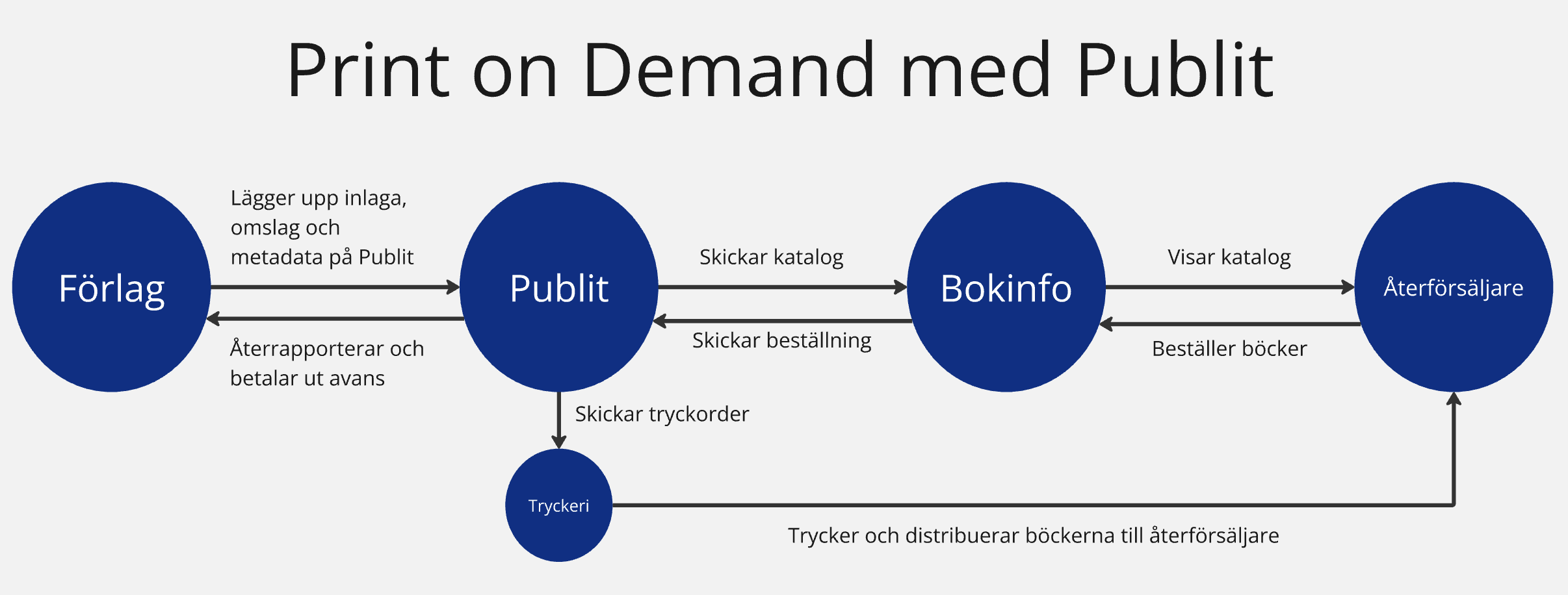
Instruction videos

Upload finished book and publish
Set price and distribution

Proof prints and self-orders
Printed books
Calculate your book
Here you can test which of our three formats best suits your book. The production price is updated as you change the number of pages, color pages, and dimensions. Prices are excluding VAT.
The anatomy of the book
Publit uses digital printing and the books are printed on-demand, one by one as they are sold. Over time, there may be some variation in print results, colors, paper types, etc. Therefore, we have compiled guidelines and recommendations for you who are going to print books through Publit.
We recommend that you always order a proof print to see how your book looks before publishing or ordering a larger quantity.
ISBN
ISBN is an international standard. Obtaining an ISBN is free in the Scandinavian countries (except in Denmark). Note that if you let Publit assign an ISBN, the edition (book, e-book, or audiobook) may be cataloged with Publit as the publisher. If you want your own publishing company to be listed as the publisher, you can apply for your own ISBN.
Interior
The interior may not be exported as a spread, it should consist of simple pages
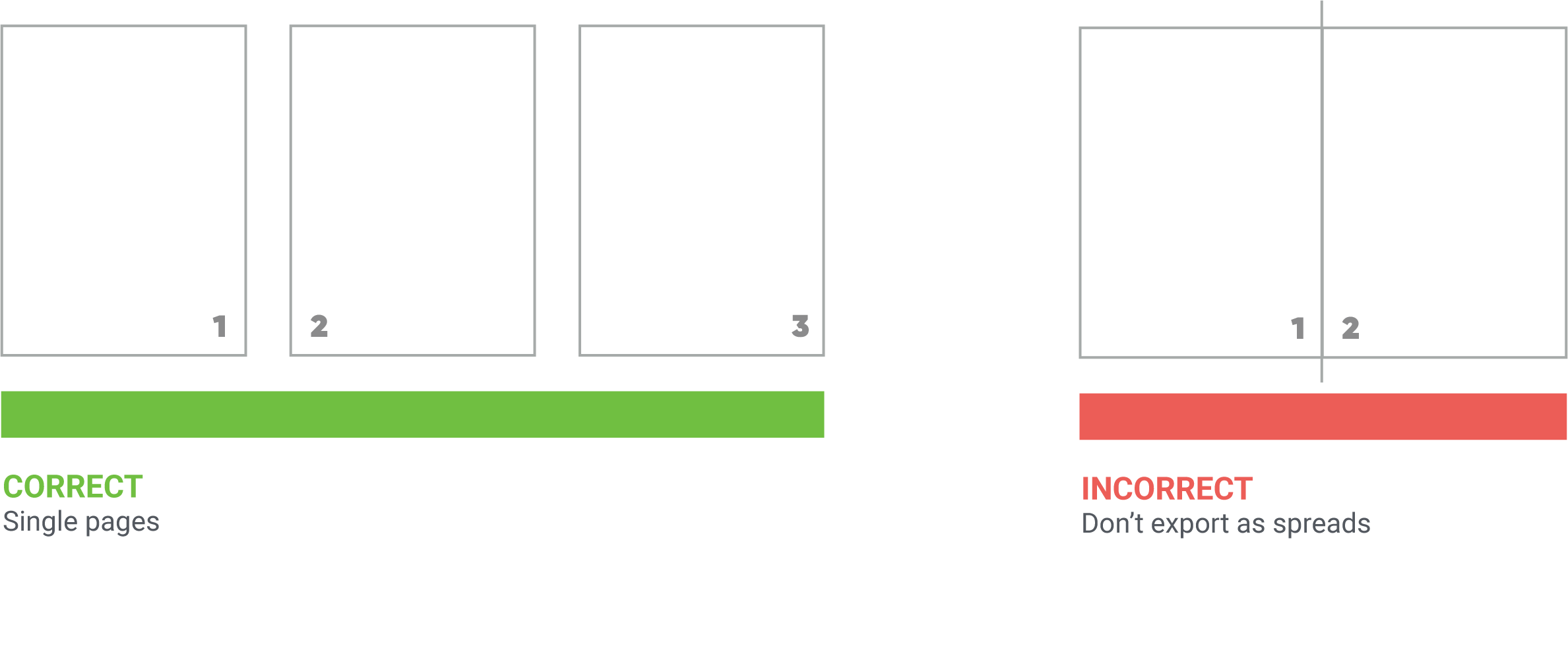
The first page of your PDF file will also be the first page of the book. Keep in mind that each odd page in your PDF file will be on the right in a spread, while each even page will be on the left in the spread.
We always add a page at the end of the insert with the year of printing, printing location, publisher, ISBN, and EAN code in connection with printing.
If you want to use a colophon or preliminary pages, or specify the place of publication and ISBN in the colophon, you'll need to add these to your text block yourself. We recommend that you do not include the printer or printing year in your text block, as this information can become outdated.
Cover
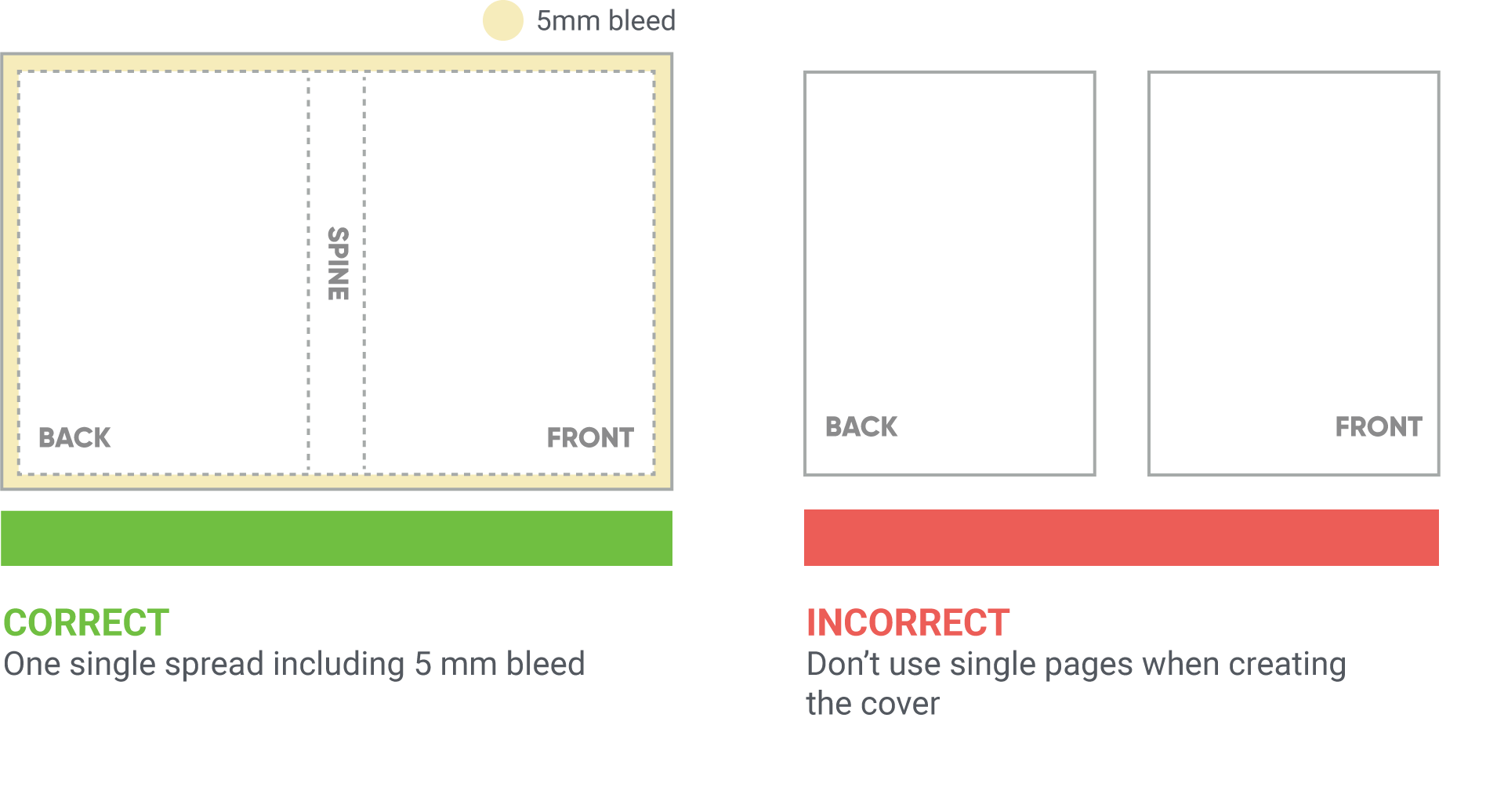
The cover should be created as a single composite sheet containing the back cover, spine, and front cover. It is also possible to print a two-sided cover. In that case, you create the cover exterior as a composite sheet and then the cover interior as a separate sheet, and then upload them as files.
Paper
We offer the following paper options:
For softcover and hardcover:
- Munken Pure 100 g (natural tone paper, uncoated)
- Arctic Matt 115 g (white paper, coated)
For EKO softcover:
- Holmen Book 60 g (natural toned paper, uncoated)
Design
Cover template
From your Publit account, you can download a cover template in PDF format after you have uploaded your book's text block. In the cover template, you can see what dimensions your cover should have, but you should not import the template into the software you use to create your print file — use the measurements to create a new document.
The three different formats that Publit offers differ slightly in their dimension calculations. Read more under each format's section.
Bleed, TrimBox, and Crop Marks
How to prepare your cover for printing
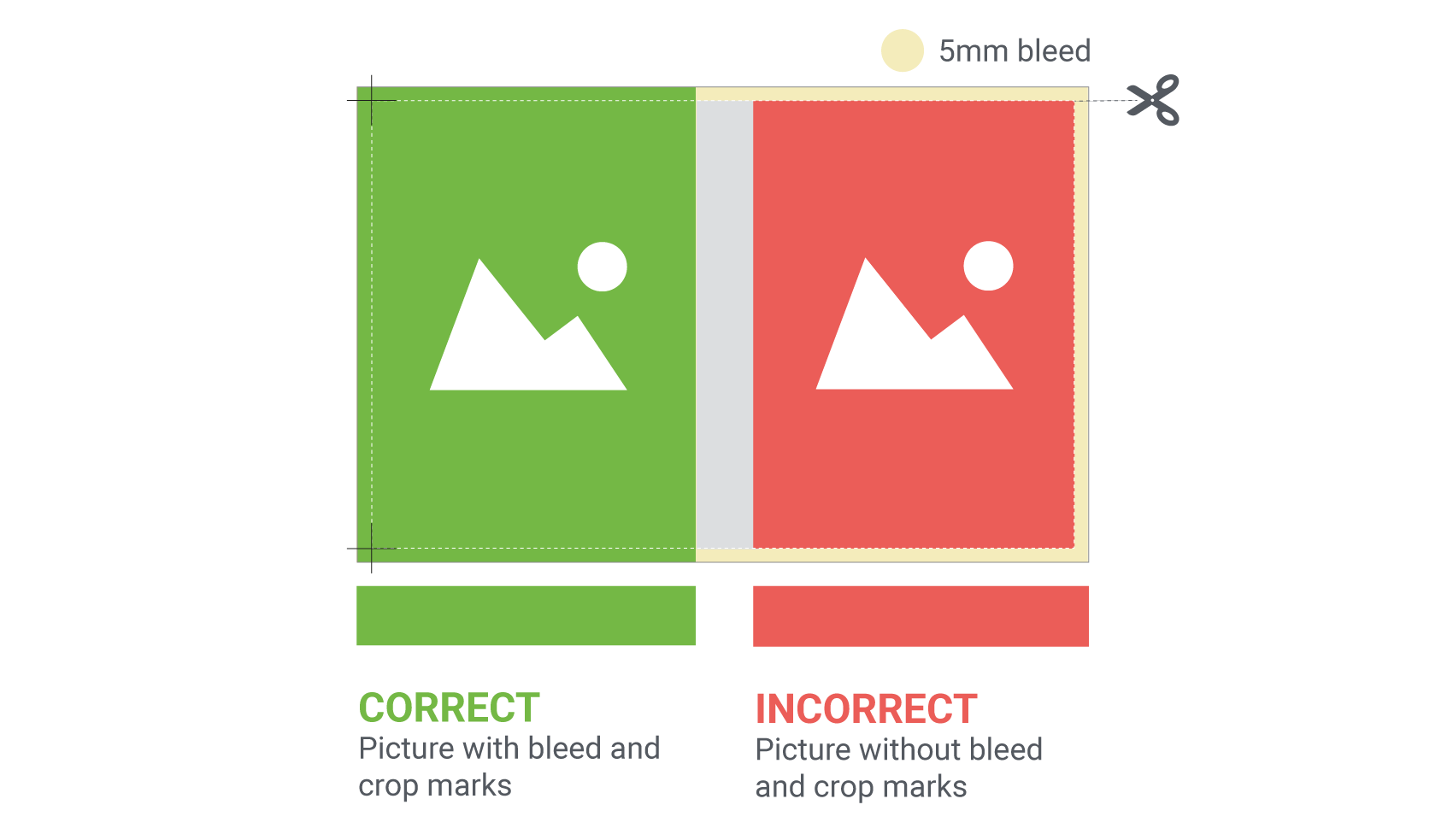
When you design a cover, it's important to think about bleed and TrimBox. These two concepts are critical to ensure your printed cover turns out correctly without any unwanted white edges.
What is bleed?
-
Bleed is an extra margin that you add outside the intended final size of your cover.
-
Think of bleed as a safety zone.
What is TrimBox?
-
TrimBox is the line that marks where the cover should be trimmed and shows the final size of a printed document after it has been cut.
-
Everything inside the TrimBox is what will remain on the finished cover.
Why is this important?
-
Without bleed, you risk getting white edges along the edges of your cover when the cutting machine trims the paper.
-
The TrimBox tells the printer exactly where they should cut.
Here's how to do it:
- Add bleed: When you create your cover in a design program (such as InDesign, Photoshop, or Illustrator), add 5 mm bleed on each outer side of the sheet.
- Make sure background images and colors cover the bleed: Extend your images and background colors all the way to the outer edge of the bleed.
- Keep important information inside the TrimBox: Make sure all important text and images are inside the TrimBox so they won't risk being cut off.
- Export with crop marks: When you export your file for printing, make sure to include crop marks. These marks show the printer where the TrimBox is and where they should cut.
If you have images with bleed on your cover and use InDesign, Affinity, or similar design software, you should extend the image 5 mm outside the document's edge. Bleed is set up to prevent the risk of your image getting white edges during printing — you should not place any important information in the bleed area because it will be trimmed off during production.
If you use a program other than InDesign, you should include a 5 mm bleed on each outer side of the sheet when creating your document. Start with the dimensions the sheet should have and add 10 mm to the width and height.
If you use InDesign, you can export to PDF with Publitsexport setting. The export setting optimizes your file and compresses images with a resolution higher than 450 ppi. It also adds a bleed of 5 mm and sets a TrimBox to show where the document should be cropped.
Color separation means converting the image from the color space used when an image is displayed on screen (RGB) to the color space used for printing on paper (CMYK). A screen can display many more colors than a paper print, which is why the printed result differs from the color reproduction you see on the screen. If your image doesn't have the correct color profile, you can perform color separation on it — a recommendation is to do this in Photoshop and then import the image into InDesign.
Images and graphics
Color profiles
- Color printing: Use CMYK "Coated FOGRA39" as the color profile.
- Black and white printing: If a page is to be printed in black and white, it must be in grayscale. If set to anything other than grayscale, the page will be printed in color.
- Color must be specified in CMYK color space, not RGB or spot color.
- Colors such as dark blue/violet, green, or beige are sensitive. During printing, some color variation may occur even though the print adheres to the ISO standard Coated FOGRA39 (ISO 12647-2:2004).
Error margins
- The printing press has a margin of error of +/- 1 mm.
This means that the paper can shift slightly during processing. You should therefore not use color or text to mark the position of the book spine.
- Avoid spine text on books with fewer than 48 pages, as the spine may become slightly rounded during printing and the spine text risks becoming misaligned.
Do not use spine text when the book spine is less than 6 mm. With a 6 mm spine, the text should not be larger than 2 mm in height. As the book grows, the spine text can increase in size, but you should maintain at least 2 mm clearance from the edges.
- Margin for error within the ISO standard: Some variation in color reproduction can occur between different print runs. There is therefore no guarantee that books printed at one time are identical to books printed at a later time.
- If you use a program other than InDesign, you must manually set the TrimBox, which can be done in, for example, Adobe Acrobat Pro. The TrimBox tells the printer where your cover should be trimmed and is a setting that must be used if you are using bleed. With 5 mm bleed, the TrimBox is set to 5 mm.
Print guide
We recommend that you create your print files in InDesign or an equivalent program designed for book design and editing. If you create your print files in another program, there is a significant risk that you will not be able to upload your print files or that the print result will not be as desired. For example, Microsoft Word is not intended for creating print-ready files, and therefore often has issues with images, color reproduction, export settings, design, and PDF document size. Using programs not designed for creating print files will compromise the print result because it is difficult to achieve exact measurements, which are necessary to design the book so that the text block and cover fit together properly.
PDF settings
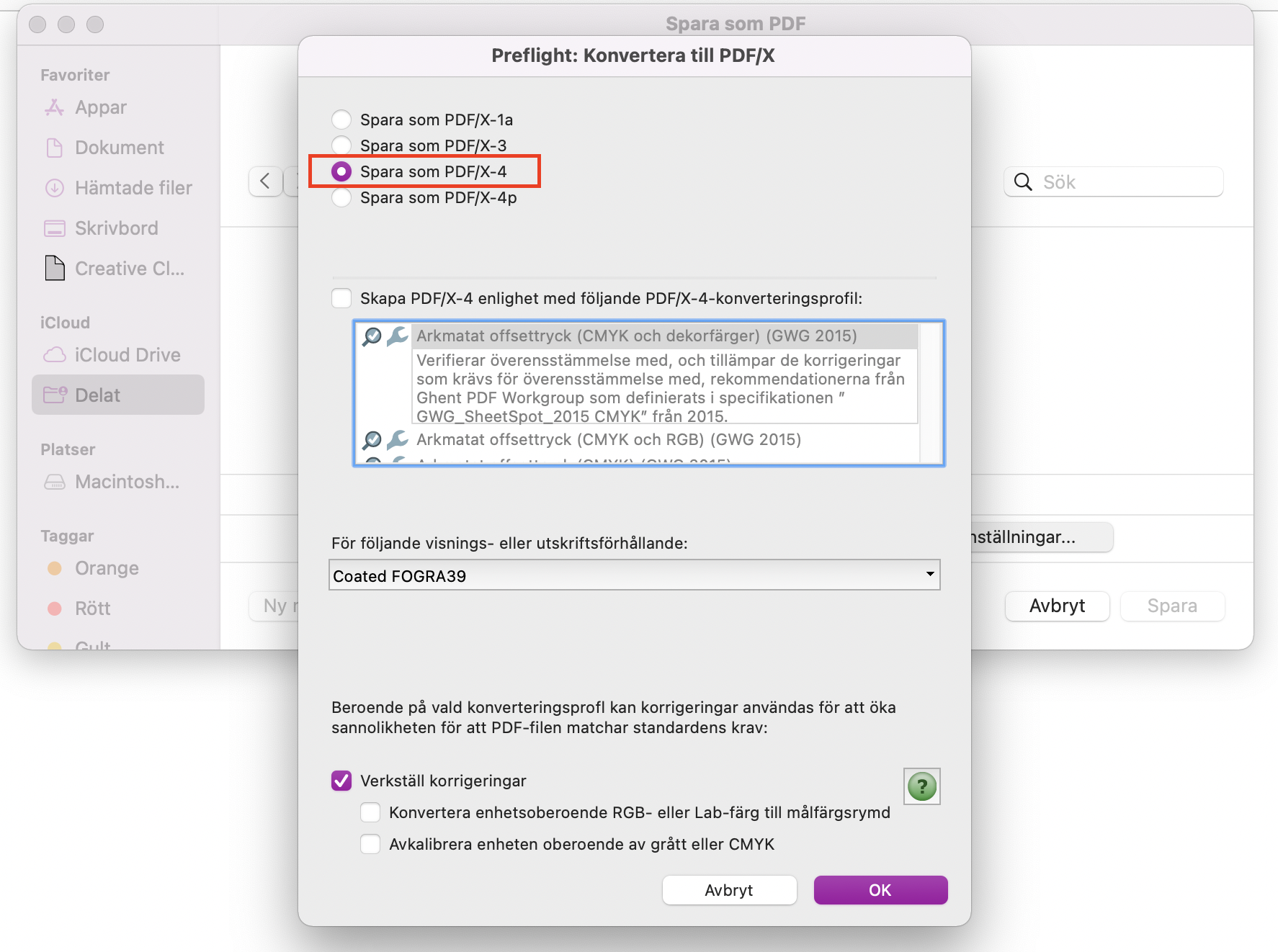
For your printed product to turn out as intended, the print file must be converted to PDF/X-4 before it is uploaded for publishing with us. By saving as PDF/X-4, fonts are included in the print file, for example, which is necessary for the font to display correctly in print. If the file is saved to another PDF version, there is a risk that fonts will not be embedded, certain fonts may be replaced with another font during printing, or characters may be replaced with other symbols. Even though the print file is a PDF, this does not necessarily mean that the file will print correctly. Certain technical requirements must be met for the result to be as expected. If you export the text block via our Job Options file, the file will be correct without these additional steps.
Export to PDF/X-4 via inDesign
Export to PDF/X-4 via Adobe Acrobat
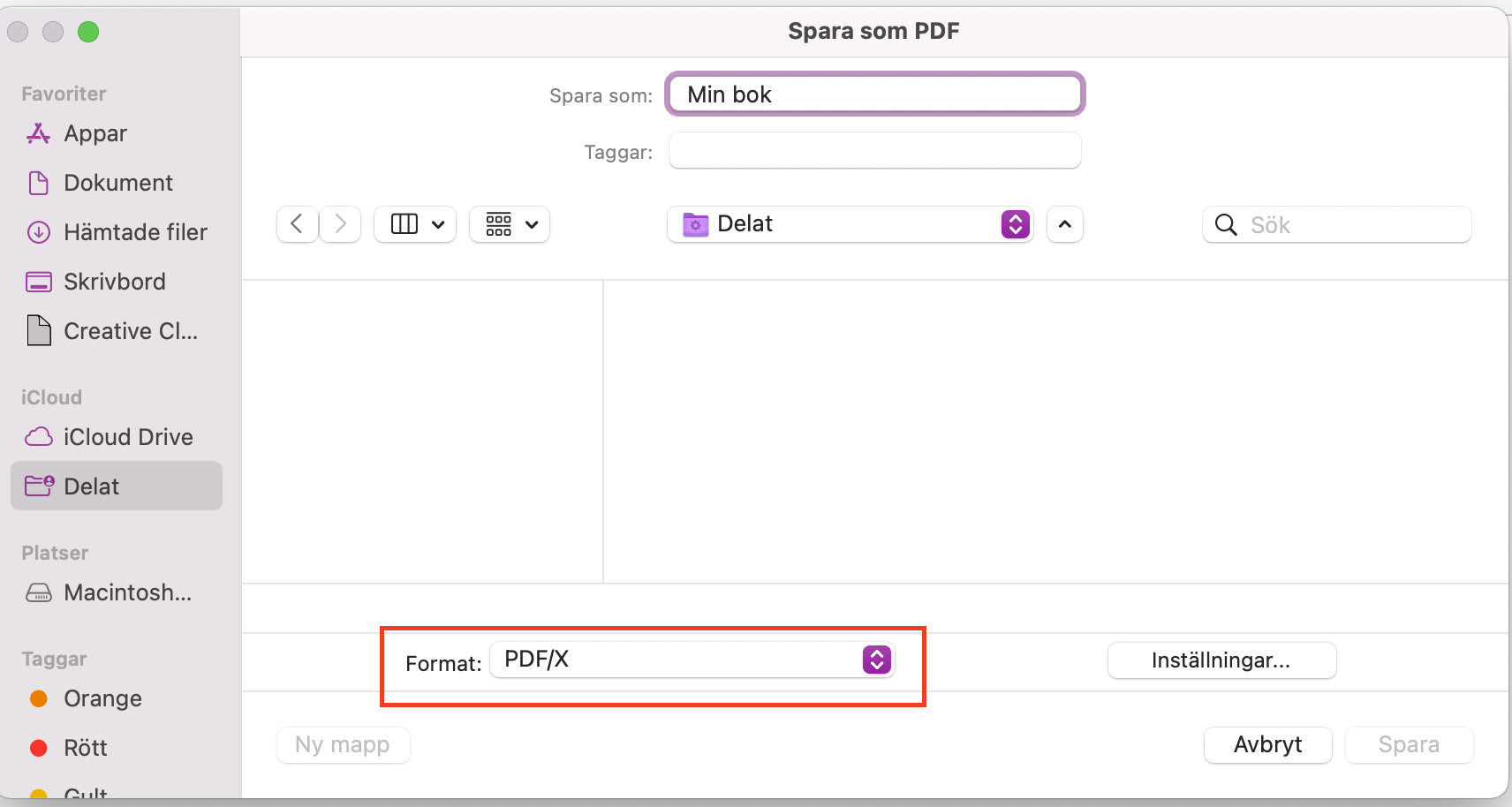
- Select "File" and then "Save as".
- Select format PDF/X.
- Continue to "Settings" and select "PDF/X-4".
- Save!
Install Job Options file (InDesign)
A Job Options file contains one or more settings that are configured when you export your text block or cover to PDF from your InDesign document. You can use it to avoid having to configure multiple export settings yourself.
- Download the zipped file.
- Unzip the folder.
- Open InDesign.
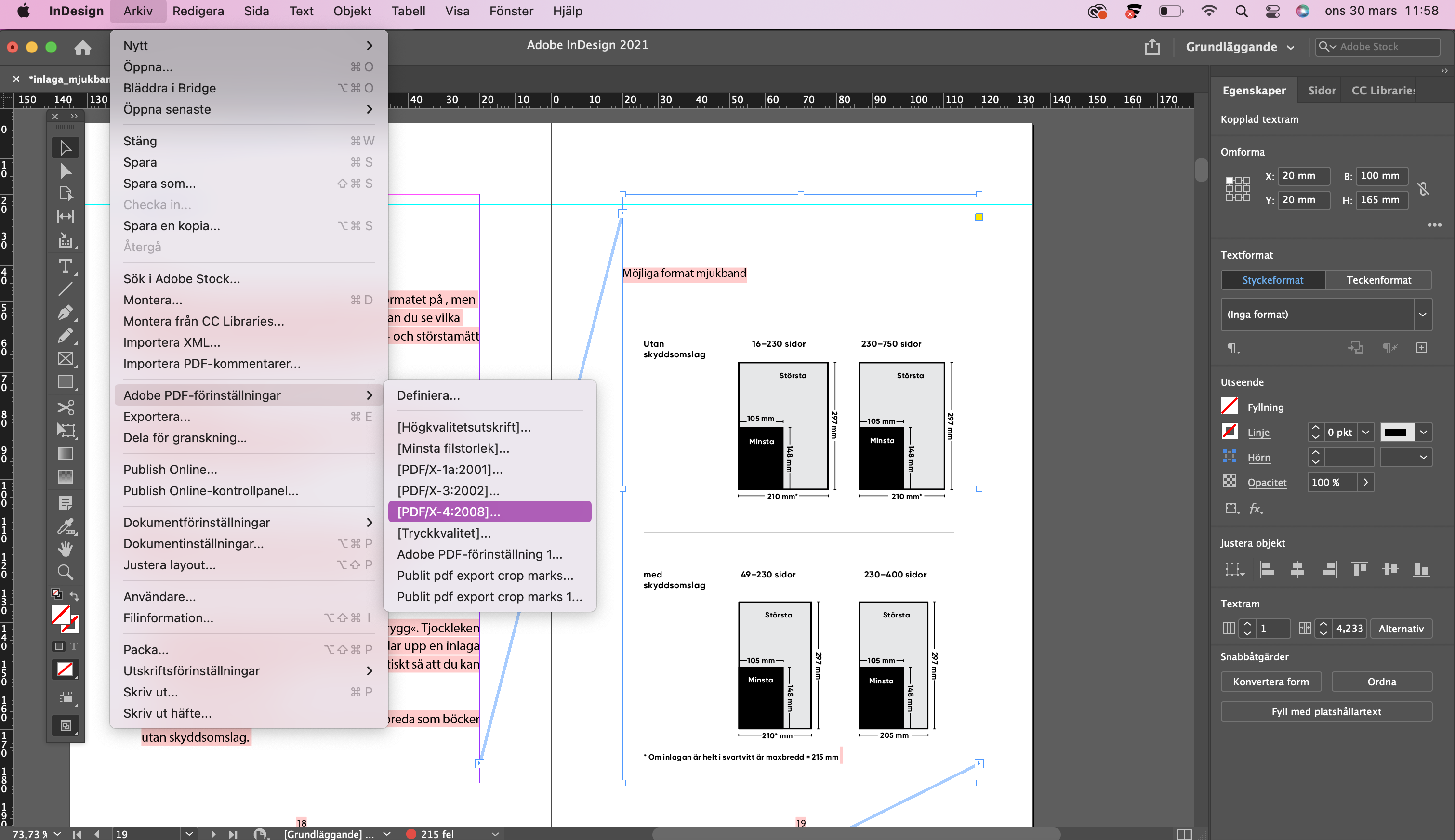
- Click on "File", "Adobe PDF Presets", "Define…".
- Click on "Load…", select the Job Options file, "Open".
If your file does not have any full-bleed images, the PDF file does not need bleed, but we still recommend that you use the Job Options file. The export setting optimizes your file and compresses images that have a higher resolution than 450 ppi. It also adds 5 mm bleed and sets a TrimBox that shows where the document should be trimmed.
Remember that the bleed serves no purpose if you have not extended the image/background at least 5 mm beyond the document edge on each side. If the image/background ends at the document edge, the bleed will be white and the book risks getting white edges during printing.
Create interior in InDesign
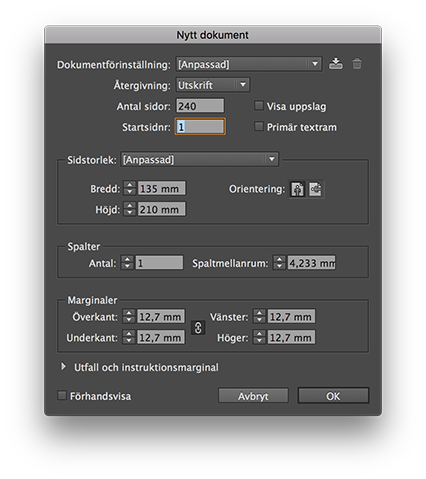
- Start by creating a new document and specify the dimensions (width and height) that you want the text block to have. The dimensions do not include bleed.
- Create the PDF file as single pages, not spreads. Optional margins can be set.
- If you have full-bleed images or graphics in the text block, you should extend the image at least 5 mm from the document edge — this becomes the document's bleed.
- When you are ready to export to PDF, go to "File", "Adobe PDF Presets" and select "Publit pdf export". Then name the file and click "Save".
Create covers in InDesign
- Start by creating a new document and specify the dimensions (width and height) that the cover should have. The dimensions do not include bleed. Use the cover template that you can download from your Publit account after you have uploaded your text block. The template should only be used as a reference, not as the background for the actual cover.
The document should consist of only one page with the dimensions that the cover should have.
The cover is created as a single sheet, which means you must add the book's front cover, spine, and back cover to determine the cover's total width. If you are creating a cover for a hardcover book, you also need to take the flaps and turn-ins into account, which are shown in the cover template.
You can set margins to mark where the spine should be placed. Under Margins, enter the width of the text block in the Inner and Outer fields to easily see the spine's placement and width as you work on your cover. If you are creating a hardcover cover, you also need to take the flaps and turn-ins into account.
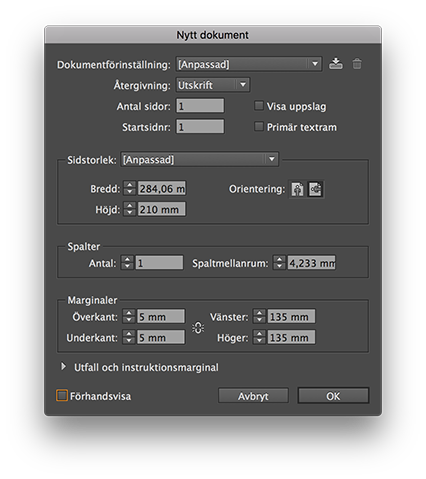
- Do you want to set up additional guidelines to, for example, mark steps and folds? "Page" and choose "Create guidelines...".
- Now you can start designing your cover, keep in mind that the page on the right will be the front of the book, while the page on the left will be the back of the book.
- If you have images or graphics extending beyond the edge of your cover, you should extend the image at least 5 mm from the edge of the document, that will be your bleed.
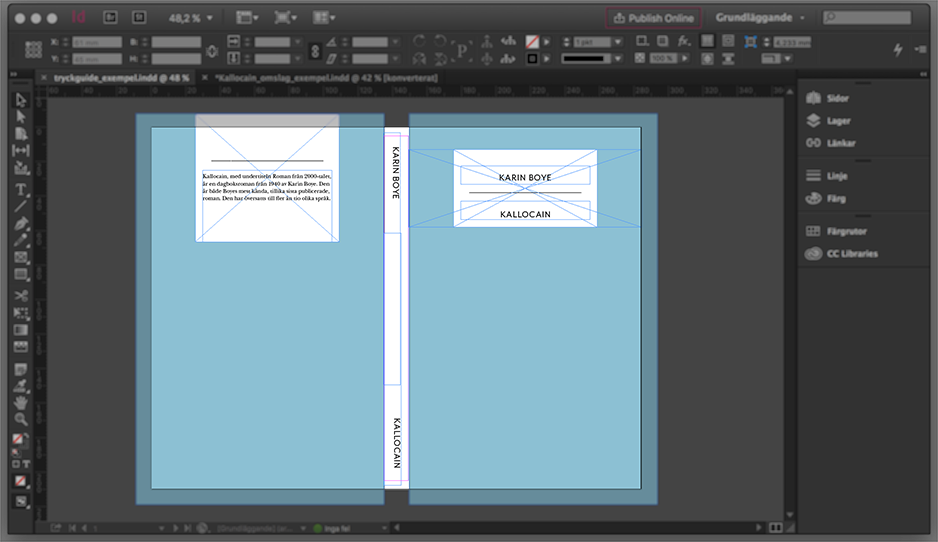
- When you are ready to export to PDF, go to "File", "Adobe PDF Presets" and select "Publit pdf export". Then name the file and click "Save".
Order your own copies
Those who have a Publit account can order proof prints and their own copies at the book's production cost, VAT and shipping costs are additional. The invoice or receipt for card payment cannot be issued to anyone other than the one who has registered the Publit account, but you can send the books to any address.
Difference between proof prints and own copies
You can order proof prints or your own copies from your Publit account at any time. Until a book is published, you can adjust the content and replace the print files as many times as you want. You can also order proof prints to check the result. After publication, you can no longer replace the print files but you can still order your own copies at production cost. The book will then be produced in the same way as your proof print.
Delivery time
Both proofs and personal copies are printed within 4–5 working days, with an additional 1–2 working days for delivery.
Track shipment
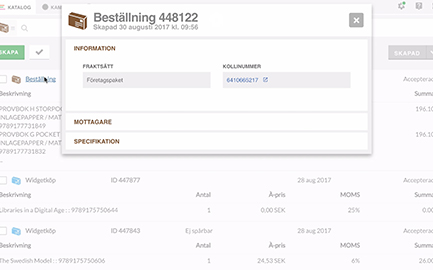
When the book/books have been printed and registered with the postal provider, a tracking number becomes available, usually 4–5 working days after the order is placed. The tracking number is automatically added to your Publit account and you can find it under "Orders".
Track shipment
[Content missing]
Metadata
Assign the book an ISBN
ISBN is a standard for identifying printed media. In order for an edition to be published and sold, it must have an ISBN. Anyone who runs a publishing business in Norway can get their own ISBN series from the Norwegian ISBN Agency at the Nasjonalbiblioteket for free.
If you do not have an ISBN yourself, you can get one from Publit by checking the box "I want Publit to assign an ISBN".
ISBN is an international standard. Obtaining an ISBN is free of charge in the Scandinavian countries (except Denmark). Please note that if you allow Publit to assign an ISBN, the edition (the book, e-book, or audiobook) can be catalogued with Publit as the publisher in the Nasjonalbiblioteket catalogue. If you want your own publishing house to be listed as the publisher, you can apply for your own ISBN(s) from ISBN Sweden at the Nasjonalbiblioteket, which is free of charge.
One ISBN per edition
The ISBN you specify must be unique. It is technically possible to enter an ISBN that has been previously published with another distributor, but this often leads to problems when loading with retailers as incorrect information is displayed. If an ISBN has already been published via Publit, it is not possible to reuse it. Therefore, always specify a new ISBN for a new edition with Publit.
Both e-books and audiobooks are considered as separate editions, therefore they should have unique ISBNs.
When an edition is published in Publit, the ISBN is locked and can no longer be changed.
EAN and ISBN in print files
There is no requirement for the book to have a colophon page with printing information, as this information will change over time. Each time the book is printed, a page is added with the printing year, place of publication, ISBN, and EAN code based on the metadata you have provided. This page appears on the book's last page and will never be charged to you as the publisher. Do not forget to place the EAN on the cover, otherwise there is a risk that the books will be lost in handling by retailers.
When you have assigned the book an ISBN in Publit, an EAN code will be created in .svg format. You can download this and insert it on your cover. If you want the EAN code in another format, there are several free services online where you can create EAN codes and download the code in the format you prefer.
If you discover errors in your print files after publishing your book, it is no longer possible to replace your print files. In cases where you wish to update an edition, you will need to publish the book again with a unique ISBN. This is to ensure that new legal deposit copies can be sent to the libraries.
Keywords
What are keywords?
Keywords are search terms that describe the content of your book. They make the book easier to find and help Bokbasen and other services to classify it by subject.
How do I add keywords?
You register keywords together with other metadata for your edition. You will find keywords under the "Categorization" tab.
NOTE: You can have a maximum of five keywords, with a maximum of 24 characters per keyword.
Separate the words with commas or press enter. A keyword can contain multiple words, for example "For a rainy day". You can enter this with a regular space between each word, before you enter a comma or press enter to register the keyword.
Which words should I choose?
- Words that appear elsewhere in the book's metadata and are already searchable. For example, the title, series, author name, or Thema category.
- Marketing: Words such as bestseller, great thriller, number one on the charts, and so on are not effective as search terms. Avoid them.
- Words that refer to books other than yours. For example, titles of similar books or names of authors who write in the same genre.
What is the difference between keywords and collections?
Under the "Categorization" tab you can fill in both keywords and collections. Keywords have been explained above. A collection is an internal grouping where you tag your works. This information is not sent to retailers. For example, you can write "Crime Fiction" or "Cookbooks". In the left column of your Publit account you will then find "Collections" where you can quickly get an overview. With the help of collections, you can freely create your own meaningful ways to organize your publishing. A book can belong to multiple collections at the same time.
Thema codes
How do you choose the Thema code?
When you register a book, you select one or more Thema codes (subject categories). Usually 1–3 codes are sufficient. It is better to choose few and specific codes rather than many general ones.
After registration, Bokbasen reviews the codes and adjusts them if necessary so that the classification is consistent and follows the guidelines. The codes are then sent to retailers and used to make your book searchable and easy to find.
Quick guide:
- The first code is the main code and should reflect the book's most important subject.
- Choose as specific a code as possible if the content is niche. If the subject is broader, choose a more general code.
- Add additional codes if needed, but only for subjects that run throughout the entire book.
- Do not mix non-fiction and fiction codes.
- You can also use supplementary codes for, for example, place or time.
- Consider how the code fits into the entire Thema system.
Prices
Production price
Protective cover: 10 kr (hardcover & softcover)
Publishing fee
Publishing a printed book costs 249 NOK excl. VAT, own copies are not included in the publishing fee.
Shipping prices
The shipping price is based on the individual weight of the book or books and the delivery address. You will see what the shipping costs at the time of order before you choose to complete the order.
Advance
Advance
Advance settlement and payment – how it works!
Margin is the amount in Norwegian krone that you as a publisher earn per sold book. It is the difference between the sales price and the costs for production and distribution. The margin is thus your profit on each book after these costs have been deducted.
At Publit there are two types of margin and these are handled in different ways;
- Margin for printed books and e-books, which are sold in the form of unit sales, via resellers or web shop
- Margin for digital books sold via streaming services
Below is described how each margin is handled.
Advances for printed books and e-books (unit sales) sold via retailers or online shops
Your advance on sales (what you have earned) is paid out at the end of the month, after the quarter has ended. If you have had sales that generated an advance during the past quarter, a statement will be available on your Publik account approximately 2 weeks after the quarter has ended. This is the statement that forms the basis for your advance payment.
If you have entered bank account details on your Publik account, we will make an automatic payment, provided that the advance exceeds 500 kronor. If the advance for a quarter is less than 500 kronor, it will be paid out in connection with the advance payment after quarter 3. Advance debt that continues to be less than 100 kronor after being accumulated from quarter 4 through quarter 3 of the following year will be written off.
You can find the advance statement by clicking on the chart symbol called "Statistics" in the menu on the left and then clicking on the "Statements" tab.

This is how you follow your sales
Complaint
Returns & Right of Withdrawal
Since books are printed at different times as they are sold, Publit cannot guarantee that each copy is identical. You should expect a margin of error of plus or minus one millimeter, as the paper can shift slightly in the machines between print runs. There is also a margin of error within the ISO standard, which means that some variation in color reproduction may occur between different prints.
All books are manufactured on your order as a customer, in the design and quantities you selected at the time of purchase. According to Section 11 § p 3, Act (2005:59) on distance contracts and contracts concluded outside business premises, there is therefore no right of withdrawal. Returns are only accepted after agreed claims.
If a package is not collected from the post office, or if an incorrect/unknown delivery address has been provided, the package will be automatically returned to us 14 days after it has been delivered to the post office.
In the event that books are returned to Publit because you have not received the shipment or provided an incorrect/unknown address, we will notify you. If you do not contact us within 14 days, the returned books will be discarded and return postage will be charged. If you wish us to deliver your order again, we will charge you for the return postage as well as the new shipping cost that occurs.
Case types
Missing delivery
If your case concerns undelivered delivery you must contact us by email within 21 working days from the order date.
Transport damage
Inspect your delivery before collecting it from your post office. Damage that occurred during transport must be reported to the post office immediately upon receipt of the damaged parcel. If you have accepted delivery of a damaged parcel, claims are no longer possible. If delivery has been made to the recipient's mailbox and the packaging is damaged, the claim must be made at the nearest post office.
Production error
Publit is not responsible for errors caused by defective print files. In cases of serious production technical defects, books can be claimed from Publit within seven working days from the date the goods were received.
How to make a claim
Use the form below to contact us in case of a complaint. Provide your order number, contact details and a brief description of the matter. Always attach images in case of production defects, the defect must be clearly visible in all images. Provided that the complaint is approved, you may need to send the damaged books back to Publit. We will review your case as soon as possible and contact you within a few days.
User Agreement
User Agreement
ABOUT THE AGREEMENT
The terms in this agreement cover all use of Publit (Publit Sweden AB, org no. 556758-3595) and come into force when you as a user accept the terms by creating an account. Changes to this agreement will be announced via email or message in the application's interface. For users who want to build integrations against Publit's APIs, there is an opportunity to sign an extended service agreement that provides access to technical guidance and special support. Contact Publit for terms and pricing.
ABOUT PUBLIT
Publit is a platform for publishing and distributing books, e-books and audiobooks made available via retailers, libraries, or directly to the end customer with Publit as agent. In no case does Publit make copyright claims on the made-available material, but has the right to unpublish material suspected of violating Swedish law.
ABOUT THE USER
The user acts either as an adult private individual or as an authorized representative of the company that is Publit's legal counterpart. It is the user's responsibility to ensure possession of disposal rights over published material, to guarantee that it does not violate Swedish law, and that files made available via Publit are technically and substantively correct. It is further the user's responsibility to inform themselves about which markets are reached via each retailer.
The user is responsible for ensuring that specified information such as contact details, bank account details, etc. is correct and continuously kept updated. It is in all cases the user's responsibility to specify the correct VAT rate when invoicing. Users who are companies must hold a valid F-tax certificate and, if the company is registered for VAT, a valid Swedish VAT registration number. Users who are private individuals are responsible for paying ordinary income tax and self-employment contributions themselves. Users who lack an F-tax certificate are encouraged to use invoicing companies with Swedish VAT registration numbers. If Publit invoices the User, Swedish VAT applies. The user is further responsible for all activity registered on the account when logged in with the user's credentials.
1. HANDLING OF PERSONAL DATA
Publit is responsible for ensuring that the user's personal data is processed in accordance with the General Data Protection Regulation (GDPR). Read more about Publit's handling of personal data here.
2. HANDLING OF METADATA AND SALES STATISTICS
Metadata associated with published books, such as author names, is governed by the Act on Mandatory Copies of Documents (1993:1392) and is therefore not considered personal data.
Publit has the right to create metadata based on the book's content for marketing purposes and to expose metadata to retailers and in other contexts. Publit further has the right to use sales data in anonymized and aggregated form.
3. COOKIES
With the user's consent, Publit stores cookies in the user's web browser in order to create a better understanding of the user's interaction with Publit's services. Cookie data may be stored on Google's servers in the USA and Google may transfer this information to third parties if Google is legally obligated to do so or if such a third party handles the information on behalf of Google. Google will not associate the IP address of Publit's users with other Google data. Please note that even if you accept this agreement, you have the right to refuse the storage of cookies (through settings in your web browser). In this case, however, Publit cannot guarantee that the service will continue to function optimally in all respects.
4. PUBLISHING
Publit undertakes to make the user's editions available by publishing article data to channels selected by the user, and to remove article data when an edition is unpublished. Publit is not responsible for delays in publishing and unpublishing that are due to deficient routines at retailers, libraries or aggregators and has no influence over which of the user's editions a retailer chooses to carry. In connection with the publication of a printed book, Publit ensures that legal mandatory copies are delivered to the national library. The user accepts that production files cannot be changed after a work is published.
In connection with distribution to retailers where the user has a direct distribution/licensing agreement, Publit has the right to act as the user's agent. This includes the right for Publit to use the user's login credentials to transfer files and metadata to the retailer, to access the user's settlements, sales and consumption reports, and the right to invoice the retailer on behalf of the user. Publit undertakes under no circumstances to spread information regarding the user's agreement with the retailer.
5. FEES
Publit's commission fee for sales via retailers is 10 percent of the user's net revenue. For sales via the webshop, Publit's agent fee is 20 percent. For printed books, a production price applies which varies depending on the book's properties.
6. CALCULATION MODELS
When selling at wholesale price, advance is calculated by subtracting the production price for (printed books), any license fee for copy protection (for e-books) and then Publit's commission fee.
When selling and lending at retail price, applicable VAT is deducted first, then each retailer's respective commission fee and then, where applicable, Publit's agent fee.
7. SALES MODELS
Sales can take place according to the following models:
A) Own copies can be ordered both before and after an edition is published. The user is then charged the production cost plus VAT and shipping.
B) Users who have a direct agreement with the aggregator service Bokinfo can make printed books available to all Swedish bookstores. Publit is responsible for sending correct metadata, while the user's agreement with Bokinfo regulates the terms regarding the extent and frequency of metadata updates and forwarding to connected retailers.
C) Books and e-books can be made available directly to end customers via the webshop, with Publit as agent. Publit handles distribution and hosting of files as well as support and guarantees that metadata is updated to all shops.
D) When selling e-books via sales channels that do not themselves store media files, Publit handles watermarking and file storage while the retailer in question handles support to the consumer.
E) When selling via Apple Books, where Apple handles hosting, watermarking and support, a commission fee of 30 percent of the retail price applies.
F) Users who have concluded a direct agreement with a retailer where Publit is specified as the distributor are themselves responsible for complying with the agreement's terms. Compensation is then based on the terms of the user's agreement with the respective retailer.
8. LIBRARY MODEL
When making audio and e-books available to libraries via OverDrive, libraries can lend an edition to an unlimited number of borrowers simultaneously, and pay the same price for each loan. A commission fee of 20 percent of the price applies to Overdrive.
9. PRICING AND AVAILABILITY
A product can be given unique regular prices for each available sales channel. Where the channel allows, the user can also set a time-limited deviation from the regular price, a so-called campaign price. Should a campaign price during a specified time period fall below the production price, the user bears the cost of sales where the production price exceeds revenue. The same applies if a retailer is granted a discount.
Publit reserves the right to continuously adjust variable production prices.
When new retailers become available and the user has previously distributed editions to retailers with the same model, Publit reserves the right to make the user's editions available in the new channel in order to maximize commercial exposure. Each edition will then be given the same price in the new channel as the highest price the edition has in an equivalent existing channel.
If an e-book is unpublished, Publit reserves the right to continue handling copies of the work via retailers or as an agent to consumers who completed a purchase before unpublication. If Publit does not handle hosting, the phase-out period may vary from retailer to retailer, which may result in some delay from when an edition is unpublished until it is removed from retailers.
10. DIRECT SALES
The webshop offers the user a platform for direct sales of books and e-books. Publit acts as agent, which means responsibility for hosting, transactions, delivery to customer and support. Publit is also responsible for continuously developing the shop and strives to create an optimal user experience, but cannot guarantee full functionality for end consumers with older web browsers. The user can create an unlimited number of shops free of charge and is responsible for ensuring that the code is implemented correctly. When selling to foreign consumers via the webshop, the VAT rate may be adjusted according to local circumstances, which may result in some variation in the user's advance.
11. SALES REPORTS, SETTLEMENTS AND INVOICING
Publit provides ongoing sales reports that are updated as soon as a retailer has registered a transaction, which may occur with some delay, and settlements that are closed quarterly and cannot be changed. The ongoing sales reports may be adjusted retroactively if orders are cancelled. In case of discrepancy between sales report and settlement, the settlement shall take precedence. Publit is not responsible for any errors in reported sales that are due to the retailer.
No later than 30 days after the end of the quarter, the advance or any debt that has accumulated is settled. If the balance is positive and exceeds 500 kronor, Publit pays the advance to the account specified by the user. The basis for advance payment can be found under the heading Settlements. Outstanding advance debt that continues to fall below 100 kronor after accumulating from quarter 4 through quarter 3 of the following year is written off.
If the user has specified an incorrect VAT registration number or has not specified a VAT registration number, advance is paid out excluding VAT. If the user has not fulfilled their payment obligations, Publit has the right to withhold amounts from sales that correspond to the claim. In case of ongoing legal dispute, Publit has the right to withhold payments until the dispute is resolved. Publit further has the right to assign invoices to third parties.
12. ORDERS, DELIVERY AND COMPLAINTS
Books are shipped via courier no later than five working days after an order is placed, but during extreme peaks in operations, additional time may be needed to process orders. Since books are printed one at a time as they are sold, some variation may occur between print runs with regard to color reproduction and trimming. The user cannot cancel or change a placed order and agrees that Publit begins production immediately upon receipt of the order. In accordance with the Distance Contracts Act provisions on made-to-order products, the user has no right of withdrawal. For serious production defects, books can be reported as faulty to Publit within seven days from receipt of the goods. In case of missing delivery, the order must be reported as faulty within 21 days from when the order was placed. Any complaints must be made via web form on Publit's help pages.
13. TERMS FOR E-BOOK CONVERSION
When converting to e-books, the user is responsible for delivering suitable material. It is not possible to replace or add material after a conversion has begun. Publit normally delivers a first draft within fifteen working days from when a conversion order is placed. The user then has 30 working days to provide any corrections. If corrections are submitted later, the user is charged for the implementation of changes. If Publit considers that a conversion should be counted as complex, the order is held until the user has accepted the price proposal.
14. ACCESS TO FILES AND METADATA
The user always has the right to download their files and metadata from Publit and to opt out of commercial distribution from a published edition. Publit reserves the right to handle and process the user's files and metadata as needed, for example, but not limited to, copying files for backup; generating thumbnails of covers for product display. Publit reserves the right to save files and metadata even if the user closes their account.
15. ENCRYPTION AND WATERMARKING
When publishing to channels that themselves store e-book files, the respective retailer handles encryption. For other channels, e-book files are stored and served to the end customer directly from Publit. In this case, Publit handles watermarking of the e-book file.
16. SECURITY
Publit follows industry standards for secure handling of user data and undertakes to continuously work to maintain a secure IT environment. Publit cannot, however, issue any guarantees against the system being attacked, and disclaims responsibility for any damages that occur as a result of attacks.
17. TERMINATION OF ACCOUNT
The agreement is valid indefinitely with a notice period of 90 days. If the user has not deactivated sales, Publit has the right to remove published editions from all sales channels. For security reasons, editions can only be deleted manually from the service. If the user wishes to completely delete editions when closing the account, this can be done for a fee. If the service were to cease, Publit undertakes to notify the user of this and to settle aggregated advance.
18. DISPUTE
Any dispute arising from the Agreement shall be finally resolved through arbitration administered by the Stockholm Chamber of Commerce Arbitration Institute (SCC). The Institute's Rules for Simplified Arbitration shall apply unless SCC, taking into account the difficulty of the case, the value of the dispute and other circumstances, determines that the Arbitration Rules of the Stockholm Chamber of Commerce Arbitration Institute shall be applied to the proceedings. In the latter case, SCC shall also determine whether the arbitral tribunal shall consist of one or three arbitrators.
Notwithstanding the above, Publit always has the right to enforce payment of matured claims in general court.